Table of Contents
The GTM Stack for Outbound: Intent & Social Tools
Layer in LinkedIn automation and additional intent signals to build a multi-channel outbound motion that drives real results.
Summarized for you
HeyReach automates LinkedIn outreach so you can execute sequences at scale without manual work. Use it when LinkedIn is your primary channel.
ZenABM aggregates intent data from multiple sources to identify prospects actively researching solutions. Use it when you want comprehensive intent signals beyond one tool.
Trigify enriches your database with LinkedIn activity and website visitor data to activate warm leads. Use it when you need real-time signals from social and web behavior.
MagicPost generates AI-powered LinkedIn content to build your personal brand and attract inbound leads. Use it when content creation is a bottleneck.
HeyReach: Automated LinkedIn Sequences
What it does
HeyReach automates LinkedIn outreach sequences, allowing you to send connection requests, messages, and follow-ups without manually clicking through LinkedIn. It runs sequences from multiple LinkedIn accounts simultaneously to increase volume while maintaining deliverability.
When to use it
- •Your ICP is active on LinkedIn and responds to cold outreach
- •You want to scale LinkedIn outreach beyond what one person can manually execute
- •You need multi-step sequences (connection → message → follow-up) automated
- •You're running account-based plays where personalized LinkedIn messages drive meetings
The verdict
Use HeyReach if LinkedIn is a primary channel for your outbound motion. It's the most reliable LinkedIn automation tool for running sequences at scale without getting accounts flagged. Skip it if your ICP doesn't engage on LinkedIn or you're focused purely on email outreach.
ZenABM: Intent Data Aggregator
What it does
ZenABM aggregates intent data from multiple sources (6Sense, Bombora, G2, Capterra, etc.) into one dashboard, showing which companies are actively researching solutions in your category. Instead of subscribing to multiple intent platforms, you get consolidated signals across all major providers.
When to use it
- •You want comprehensive intent signals without paying for 6Sense, Bombora, and G2 separately
- •Your ICP researches solutions extensively before buying (high consideration purchase)
- •You're running ABM plays targeting in-market accounts
- •You need to prioritize outreach based on buying intent
The verdict
Use ZenABM if you're targeting mid-market or enterprise accounts with long sales cycles where intent data materially improves conversion. Skip it if you're selling to SMBs with short sales cycles or your ICP doesn't heavily research online before buying.
Trigify: LinkedIn & Website Activity Signal Enrichment
What it does
Trigify enriches your existing database with LinkedIn activity signals (profile views, post engagement) and website visitor identification. It tells you which prospects in your CRM are actively engaging with your content or visiting your site, triggering automated workflows based on these behaviors.
When to use it
- •You have an existing database of prospects who might be engaging with you on LinkedIn
- •You want to trigger outreach based on real-time social or web behavior
- •You're running content-led outbound where engagement signals buying intent
- •You need to identify warm leads from inbound traffic (similar to Warmly but for existing lists)
The verdict
Use Trigify if you're actively publishing LinkedIn content and want to capitalize on engagement signals. It's powerful for re-engaging dormant leads who show new activity. Skip it if you don't post on LinkedIn regularly or your database doesn't engage on the platform.
MagicPost: AI-Powered Content Generation
What it does
MagicPost uses AI to generate LinkedIn posts optimized for engagement, helping you maintain a consistent posting schedule without spending hours writing content. It creates posts in your voice based on topics you provide, formatting them for maximum reach on LinkedIn's algorithm.
When to use it
- •You want to build a personal brand on LinkedIn but content creation is a bottleneck
- •You're running a content-led outbound strategy where visibility drives inbound leads
- •You need to post consistently (3-5x per week) and struggle to generate ideas
- •You want to scale personal brands across multiple team members
The verdict
Use MagicPost if LinkedIn content is part of your GTM strategy but you lack the time or expertise to create it consistently. It's best for founders or sales leaders who understand the value of personal branding but can't dedicate hours to writing. Skip it if you already have a content engine or don't believe LinkedIn visibility drives results for your ICP.
How They Work Together: Multi-Channel Workflow
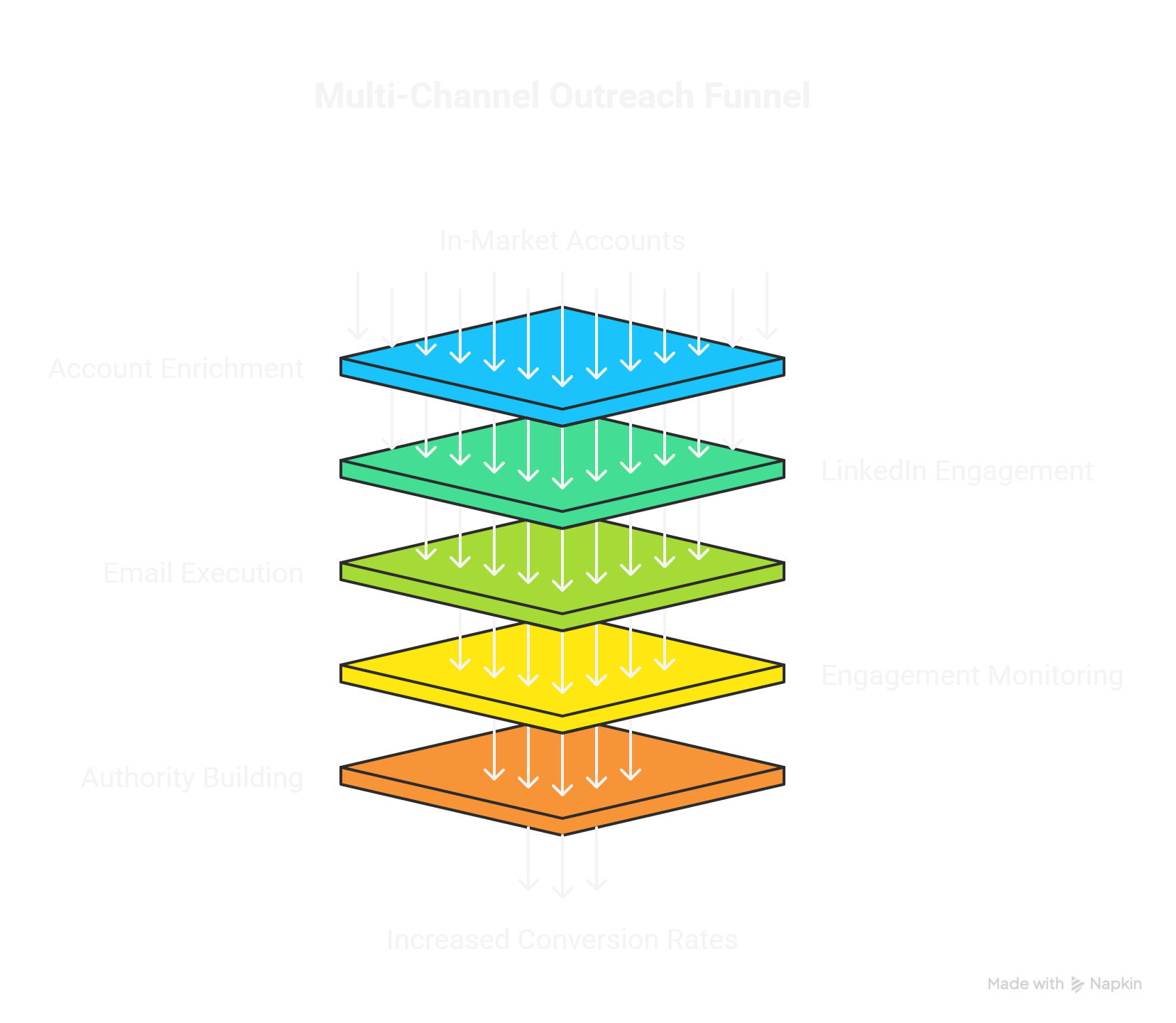
These tools layer on top of your foundation stack (from Part 1) to create a multi-channel outbound motion:
ZenABM identifies in-market accounts
Pull intent signals showing which companies are researching your category
Clay enriches those accounts with contacts
Use your foundation stack (Clay + Findymail/BetterContact) to find decision-makers
HeyReach runs LinkedIn sequences
Automated connection requests and personalized messages to warm leads
Instantly executes parallel email sequences
Run coordinated email campaigns to the same targets
Trigify monitors engagement signals
Track who views your LinkedIn profile or visits your website after outreach
MagicPost builds your authority
Consistent content keeps you visible to prospects researching solutions
Result:
A coordinated multi-channel strategy where prospects see your content, receive personalized LinkedIn messages, get email sequences, and encounter your brand across multiple touchpoints—dramatically increasing conversion rates compared to single-channel outreach.
People also read
The GTM Stack for Outbound: Foundation & Research Tools (Part 1)
Build a complete go-to-market stack starting with the essential foundation tools for intent data, contact enrichment, and email verification.
The GTM Stack for Outbound: List Building & Automation (Part 3)
Complete your GTM stack with comprehensive list building and automation tools for scaling outbound efficiently.
7 Must-Have N8N Automations for B2B Marketers [2025 Guide]
Free downloadable N8N workflow templates for lead generation, CRM sync, and automated reporting. The Zapier alternative that saves $1,000+/year.
Published: November 2025 | Reading time: 10 minutes